

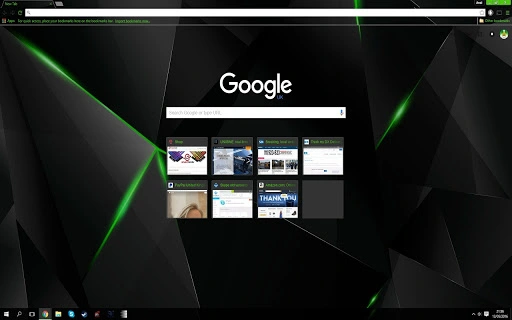
Description
Green Browser Theme with Blended Tabs
The Green Browser Theme is a desktop customization utility designed to enhance the visual experience of web browsing. Tailored for users who appreciate aesthetic coherence and personal expression, it transforms the user interface of supported browsers with a cohesive green color scheme. The theme addresses the need for a visually appealing, distraction-free browsing environment by introducing blended background tabs and refined color contrasts. It is ideal for professionals and casual users seeking to personalize their digital workspace without compromising usability. Real-world scenarios include remote workers enhancing focus through consistent visual design, students organizing their digital workflow, and creatives seeking inspiration from vibrant yet balanced color palettes. The theme is lightweight and focused on UI refinement, making it suitable for users who value both form and function in their daily computing tasks.
Key Features & Capabilities
- Green Color Scheme – A harmonious green palette applied across the browser interface, promoting visual comfort and aesthetic consistency.
- Blended Background Tabs – Introduced in version 2, this feature softens tab transitions and improves visual hierarchy by blending tab backgrounds with the overall theme.
- Enhanced Color Contrast – Version 3 refined key elements such as the download bar (now black) and link colors (white for Gmail and images), improving readability and navigation.
- Tab Visibility Indicator – Users can clearly identify the active tab, reducing navigation errors and enhancing workflow efficiency.
- Lightweight Design – At just 2.5 MB, the theme imposes minimal system load, ensuring fast application and minimal impact on performance.
These features collectively support users in creating a more immersive and personalized browsing experience. For example, a designer using multiple browser tabs can quickly identify the active one, while a student managing research tabs benefits from reduced visual clutter. The theme’s subtle yet effective design choices cater to users who value both style and practicality in their digital tools.
User Interface, Workflow & Performance
The user interface of the Green Browser Theme is entirely dependent on the host browser’s rendering engine, as it operates as a visual overlay rather than a standalone application. Navigation is straightforward: users apply the theme via their browser’s extension or theme manager, with no complex setup required. The workflow is optimized for simplicity, allowing immediate visual transformation upon activation. The theme does not alter core browser functionality, preserving standard behavior while enhancing appearance.
Performance is expected to remain stable due to the theme’s lightweight nature. The developer did not specify resource usage details, but based on its size and design approach, it is unlikely to significantly impact CPU or RAM usage. Stability is maintained through consistent rendering across supported platforms. The theme’s design avoids animated elements or heavy scripts, minimizing the risk of lag or crashes. General performance observations are based on typical behavior of similar lightweight UI enhancements.
Compatibility & System Requirements
The Green Browser Theme is compatible with both Windows and Mac operating systems. It supports modern web browsers that accept user themes, though specific browser versions are not listed. The installation size is 2.5 MB, which is minimal and suitable for most devices. Exact system requirements were not listed, and compatibility information was partially provided. Users should ensure their browser supports theme customization, as this is a prerequisite for functionality. The theme is designed to work seamlessly across different screen resolutions and display settings.
Pros and Cons
Pros
- Visually appealing green color scheme enhances browsing aesthetics
- Blended tabs improve visual clarity and user experience
- Lightweight at just 2.5 MB, low system impact
- Simple one-click application via browser theme manager
- Refined color contrasts in version 3 improve readability
Cons
- Requires a browser that supports theme customization
- No advanced customization options beyond color schemes
- Limited to visual changes; no functional enhancements
- Developer information not provided
- Updates depend on developer’s schedule, with no automatic update system
FAQ Section
Is the Green Browser Theme compatible with my browser?
The theme works with browsers that support user themes. Compatibility depends on your browser’s current version and settings. Check your browser’s theme manager to confirm support.
Is the theme safe to download and use?
Yes, the theme is distributed via a secure link and does not include executable code or scripts. It is designed solely for visual customization and poses no security risk when used as intended.
How do I update the theme?
Updates are released manually by the developer. Users must check the provided link for the latest version and reapply the theme after downloading.
Can I use this theme offline?
Yes, once installed, the theme functions entirely offline. No internet connection is required for it to remain active.
What is the license type for this theme?
The theme is available for free use with no restrictions. It is not tied to any commercial license or subscription model.
Final Thoughts + CTA
The Green Browser Theme offers a clean, visually engaging way to personalize your browsing experience without sacrificing performance. Its lightweight design, refined color scheme, and improved tab visibility make it a practical choice for users who value aesthetics and usability. While it lacks advanced functionality, it excels in its core purpose: enhancing the look and feel of your browser. Professionals, students, and creative users seeking a distraction-free, stylish interface will find this theme particularly beneficial. With its simple setup and minimal resource footprint, it stands out as a reliable desktop utility. Download Green Browser Theme now.
Guides & Tutorials for Black Green Shards Theme for Chrome
How to install Black Green Shards Theme for Chrome
- Click the Preview / Download button above.
- Once redirected, accept the terms and click Install.
- Wait for the Black Green Shards Theme for Chrome download to finish on your device.
How to use Black Green Shards Theme for Chrome
This software is primarily used for its core features described above. Open the app after installation to explore its capabilities.
User Reviews for Black Green Shards Theme for Chrome 0
No reviews found





